
Download L Astrologue – Free Astrology Chart App, Numerology & Biorhythm Tool
Overview of L Astrologue
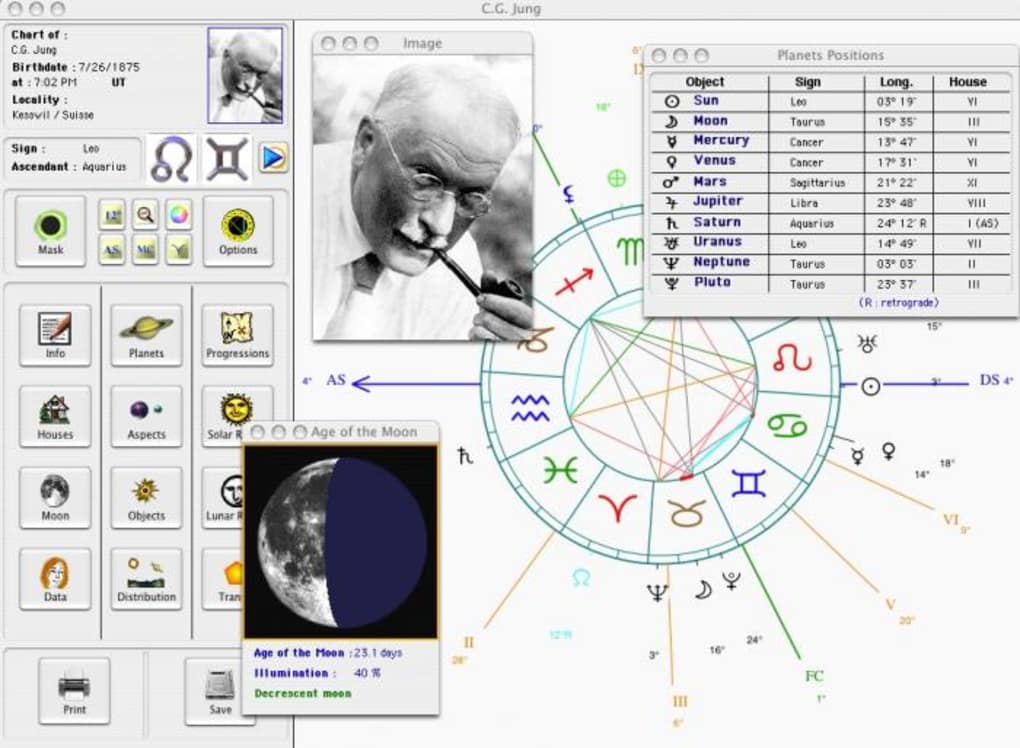
L Astrologue is a vibrant, multi‑disciplinary astrology platform that lets users explore their natal charts, daily moods, and deeper astrological patterns without paying a dime. The application combines classic Western astrology with complementary belief systems such as biorhythms, numerology, and planetary transits, presenting everything on a colorful, interactive interface. Users start by entering their birth data—date, time, and location—and instantly receive a dynamic astral chart that can be tweaked by adding or removing planets, houses, and even symbolic objects like crystals or talismans.
The calendar view displays the progression of your Sun sign throughout the year, while the “Mood Today” widget offers a quick snapshot of emotional influences based on the current planetary positions. Although the visual design is modern and the tool feels polished, newcomers may notice a lack of in‑app tutorials or contextual help. Editing personal data such as town or birth time requires navigating a hidden settings panel, which can be confusing for first‑time users.
Despite this learning curve, the overall experience is enjoyable, especially for hobbyist astrologers who appreciate a free, aesthetically pleasing environment that encourages experimentation across several metaphysical disciplines.
Key Features That Set L Astrologue Apart
- Dynamic Astral Chart Builder – Drag‑and‑drop planets, nodes, and custom symbols onto a live chart that updates in real time.
- Integrated Calendar – View your Sun, Moon, and rising sign progression on a monthly calendar with colour‑coded highlights.
- Multi‑Disciplinary Tools – Switch between astrology, biorhythms, and numerology modes without leaving the app.
- Personalised Mood Indicator – A daily “Mood Today” widget uses current planetary aspects to suggest emotional states.
- Customisable Themes – Choose from several colour palettes and background images to match your personal aesthetic.
- Export Options – Save charts as PNG, PDF, or share directly to social media platforms.
- Free Updates – Regularly receives new planetary data and minor UI tweaks at no cost.
- Cross‑Platform Sync – Sync your profile via cloud to access charts on Windows, macOS, Android, and iOS devices.
Installation, First‑Time Setup and Compatibility
Getting L Astrologue up and running is straightforward. The installer is available for download from the official website and the major app stores. Follow these steps to start exploring your stars:
- Download the installer – Choose the version that matches your operating system (Windows 10/11, macOS 10.15+, Android 8.0+, or iOS 13+).
- Run the installer – On desktop platforms, double‑click the .exe (Windows) or .dmg (macOS) file and follow the on‑screen prompts. Mobile users simply tap “Install” from the store.
- Create an account (optional) – Register with an email address to enable cloud sync. This step can be skipped if you prefer local storage.
- Enter birth data – The first‑time wizard asks for your date, time, and place of birth. If you’re unsure about the exact time, the app offers a “Solar Chart” fallback that uses a noon default.
- Explore the dashboard – After saving your data, you’ll land on the main dashboard where the dynamic chart, calendar, and mood widget appear side by side.
Supported operating systems include Windows 10/11 (64‑bit), macOS 10.15 Catalina and later, Android 8.0 Oreo onward, and iOS 13 or newer. The application requires at least 2 GB of RAM and 150 MB of free disk space. Because L Astrologue is built with a cross‑platform engine, the user interface remains consistent across devices, though touch‑optimised gestures are available only on mobile versions.
For users who encounter difficulties editing personal details later, the settings icon (a gear) in the top‑right corner opens a hidden “Profile” tab where you can modify town, latitude/longitude, and birth time. While not immediately obvious, a quick look at the “Help” button in the lower‑left corner reveals a short tip that points to this hidden area.
Pros, Cons, Frequently Asked Questions & Final Thoughts
Pros
- Beautiful, colour‑rich interface that makes chart reading enjoyable.
- All‑in‑one platform covering astrology, biorhythms, and numerology.
- Free to download and regularly updated with new planetary data.
- Cross‑device sync lets you continue your analysis on any platform.
- Export options for sharing charts on social media or printing.
Cons
- Lack of an in‑app tutorial or detailed help guide for beginners.
- Editing personal data (town, birth time) is hidden behind a less‑obvious menu.
- Advanced astrological techniques (e.g., progressed charts) are not supported.
- Occasional UI lag on older Android devices with limited RAM.
Frequently Asked Questions
Is L Astrologue really free?
Yes, the core application is completely free. All major features, including the calendar and biorhythm modules, are available without charge. Optional premium skins may be purchased, but they do not affect functionality.
Can I import my existing birth data from another astrology app?
L Astrologue supports CSV import for basic fields (date, time, location). For more complex data (house systems, aspect grids) you’ll need to recreate the chart manually.
Does the app work offline?
All core calculations are performed locally, so once the app is installed you can generate charts without an internet connection. Cloud sync and updates, however, require online access.
What planetary data does L Astrologue use?
The software relies on the JPL DE430 ephemeris for planetary positions, ensuring high‑precision calculations for Sun, Moon, planets, and major asteroids.
Is my personal data secure?
Yes. When you create a cloud account, data is encrypted in transit (TLS 1.3) and at rest (AES‑256). No third‑party advertising networks have access to your birth details.
Conclusion & Call to Action
Overall, L Astrologue delivers a delightful blend of visual appeal and functional depth that makes daily astrological exploration accessible to both casual users and seasoned chart readers. While the absence of a comprehensive help system may pose a short‑term hurdle for beginners, the free price tag, regular updates, and multi‑platform availability more than compensate for this shortcoming. If you’re looking for a colourful, all‑in‑one astrology tool that also touches on biorhythms and numerology, L Astrologue is worth a download. Get started today by clicking the download button below, create your profile, and watch the heavens unfold on your screen.







